CIS Benchmark Implementation for SMB Endpoint Fleets
Configure Windows endpoints to eliminate the misconfigurations that account for most breaches.
Most successful breaches don't start with a zero-day exploit or a clever piece of malware. They start with a system that was set up wrong. Three categories of weakness account for the vast majority of incidents: unpatched software, weak or stolen credentials, and insecure configurations. Of those three, insecure configurations are the easiest to find and fix, because finding them doesn't require new tools or a bigger budget. A default setting left in place, a service running that nobody needs, a file share with permissions open wider than it should be, audit logging switched off: these are the gaps attackers walk through to get initial access and then escalate privileges once inside.
For a small or mid-size business, this problem runs deeper than a technical gap. One person often handles IT, compliance, vendor relationships, and user support at the same time. Configuration gaps don't persist because nobody cares. They persist because nobody has the hours in the week, or a clear enough set of steps, to close them. Misconfiguration risk appears not as a rare mistake but as a standing condition, built into day-to-day operations, until something forces a closer look.
What CIS Benchmarks are and how they are structured for implementation
CIS Benchmarks give a lean IT team something hard to find elsewhere: a free, technology-specific configuration standard, built and reviewed by a global community of practitioners, that lines up with the compliance frameworks most businesses eventually have to answer to. That overlap with compliance is a useful side effect. The real reason to adopt CIS Benchmarks is that they tell a non-specialist exactly which settings make a system harder to break into, system by system, without requiring a security background to interpret.
Every benchmark splits its recommendations into two profiles, and understanding that split matters before changing a single setting. Level 1 controls carry minimal operational impact and work for nearly every production system, so if you run a small business, start there. Level 2 controls add restrictions meant for high-security or sensitive-data environments, and they can break applications outright: disabling USB storage entirely, or requiring FIPS 140-2 cipher suites, are two examples that come with real functionality trade-offs. CIS Implementation Group 1 (IG1) captures this same idea at a higher level: it's described as essential cyber hygiene, the baseline every organization should hit before taking on anything more advanced.
The recommendations within each profile carry a second label worth understanding before pulling a compliance report. Some are Scored, measured as pass or fail by an automated tool. Others are Not Scored, so they need human judgment to assess properly. A high compliance score from a scanning tool reflects only the scored, automatable checks. It says nothing about the Not Scored items a tool can't evaluate on its own, so a high number from an automated scan is a partial picture, not a clean bill of health.
Taking a baseline assessment before touching any settings
Before changing a single setting, the fleet needs a real baseline. Skipping this step is the single most common mistake among lean IT teams running their first hardening pass, and skipping it guarantees two bad outcomes at once: time spent hardening low-risk systems that didn't need it, and critical gaps left untouched on the systems that did.
CIS-CAT Pro is the official automated assessor for CIS Benchmarks, available to CIS SecureSuite members, and it produces reports in HTML, CSV, TXT, XML, and JSON formats showing pass/fail status for every scored recommendation (the JSON output can also be generated as a non-passing-only variant, useful for focusing on just the gaps). For cloud infrastructure, assessment doesn't require installing an agent at all: AWS Security Hub runs the CIS AWS Foundations standard, Azure Policy ships CIS initiatives, and Google Cloud's Security Command Center runs continuous checks against the same benchmarks.
Once the scan results come back, don't look at a single combined score. Document compliance separately by system type: Windows Server domain controllers scored on their own, macOS developer workstations scored on their own. A blended average hides exactly where the risk sits. From there, prioritization follows a simple rule: the systems that move to the front of the remediation queue are the ones combining a low compliance score with high business criticality, not simply the ones with the lowest number on the report. A workstation with a terrible score but no access to sensitive data waits. A domain controller with a mediocre score goes first. Record these baseline scores, along with criticality ratings, in a configuration management database, so the order of remediation is documented and defensible when someone asks why system A got fixed before system B.
Which Windows and Microsoft 365 controls to address first
Most SMB endpoint fleets run Windows, and within the full CIS Windows benchmark, a small set of Level 1 control families drives most of the actual risk reduction. Working through them in order of impact relative to disruption is what makes a hardening project survivable for a team without dedicated security staff.
Account policies come first. Account policies require a minimum password length, account lockout after a set number of failed attempts, and the Local Administrator Password Solution (LAPS) deployed so every device gets a unique local admin password. Disabling the built-in Guest account belongs in this same first pass.
Network security settings come next. LAN Manager hash storage gets disabled, and the LAN Manager authentication level gets set to send NTLMv2 responses only, refusing LM and NTLM. The CIS Microsoft Intune for Windows 11 Benchmark v5.0.0 tightened this control further, changing the setting from "Send LM and NTLMv2 responses only. Refuse LM and NTLM" to "Send NTLMv2 responses only. Refuse LM and NTLM," closing off the weaker LM response path.
Windows Firewall needs to be enabled on all three profiles, Domain, Private, and Public, with a default-inbound-block, default-outbound-allow posture and dropped-packet logging turned on. This is a Level 1 requirement, and it's frequently missing on SMB endpoints that were never configured with it in mind.
SMBv1 needs to be disabled. This is a Level 1 CIS requirement on its own terms, and it also shuts the door on a class of interception and downgrade attacks that have driven some of the most damaging ransomware campaigns on record.
Audit policies matter as much as the controls they monitor. At minimum, log credential validation successes and failures, user account management changes, logon and logoff events, and security system integrity events. These logs make a post-incident review possible.
User Rights Assignment closes out the first pass: restrict which groups can perform privileged operations. "Access this computer from the network" should be limited to Administrators and Authenticated Users, and local logon rights should be restricted to specific groups.
For organizations managing Windows 11 fleets through Intune, the June 2026 refresh of the CIS Microsoft Intune for Windows 11 Benchmark changes what "hardened" means in practice. Version 5.0.0, released 25 June 2026, adds roughly 22 new controls and removes about 25 older ones, so the total control count drops from approximately 457 to 419. That's consolidation, not a lowering of the bar.
The most consequential addition is a new Device Compliance Policy section: seven Level 1 controls covering BitLocker, Secure Boot, Code Integrity, Firewall, TPM, Antivirus, and Antispyware. These function as compliance signals rather than configuration pushes, and paired with Conditional Access, they gate access to corporate resources on a device's actual health at every sign-in, not just at enrollment. The benchmark also adds SMB hardening specific to this version: minimum SMB dialect set to 3.1.1 on both client and server (all Level 1), mailslots disabled, and an authentication rate limiter enabled with a delay of at least 2000ms to slow brute-force attempts against the SMB server. A new LSASS protection control sets "Allow Custom SSPs and APs to be loaded into LSASS" to Disabled, closing off a credential-interception path.
One operational note for anyone maintaining a spreadsheet of control numbers: several sections were renumbered in v5.0.0 because of the removals. Global Recommendation IDs (GRIDs) stay stable across versions and are the right thing to track.
Sequencing Remediation Without Causing Outages
Rolling out every CIS recommendation at once is the fastest way to kill a hardening program in its first week. Certain Level 1 controls reliably break production systems when you deploy them without testing first, and one broken application is often enough for a business to pull back from the whole project.
Test every change in a staging environment that mirrors production configuration before you let any automated remediation touch live systems. Applying hardening at scale by hand, one endpoint at a time, doesn't hold up past a few dozen machines. Configuration management tools are built for exactly this job: Ansible, Puppet, Chef, and Windows Group Policy or DSC apply settings consistently and keep them applied. A formal exception process matters just as much as the tooling. Without one, teams end up ignoring hardening altogether or breaking applications that depend on a setting CIS wants disabled. Every control that can't be applied in a given environment needs a documented exception, a compensating control standing in its place, and a review date to revisit it.
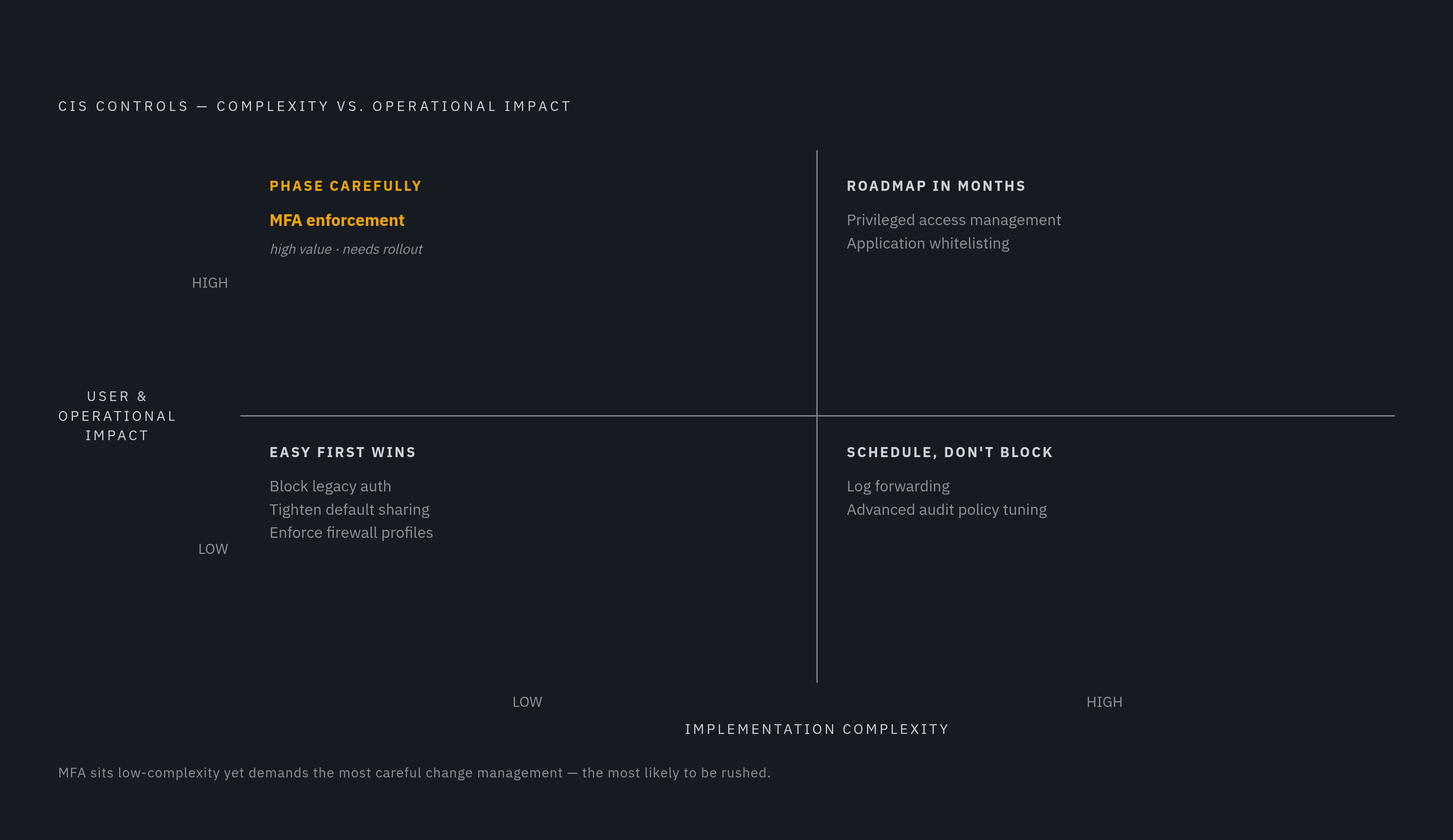
Sequencing the work comes down to weighing impact against complexity. Some controls are low complexity and low impact on users, which makes them easy first wins: blocking legacy authentication protocols, tightening default sharing settings, enforcing firewall profiles across Domain, Private, and Public. Other controls are low in technical complexity but high in user impact, and MFA enforcement is the clearest example: the security value is high, but it needs user communication and a phased rollout, not a flip of a switch on a Monday morning. A third group is high in complexity but low in impact, worth doing but not worth blocking progress over: log forwarding configuration, advanced audit policy tuning. The fourth group, high complexity and high impact, covers the long-term projects: full privileged access management, application whitelisting. These belong on a roadmap measured in months, not a weekend sprint.
Preventing configuration drift after the initial hardening pass
If a hardening pass isn't backed by ongoing monitoring, it starts losing ground within weeks. OS updates, new application installs, user privilege changes, and new devices joining the fleet all pull systems away from the configuration that was just locked down. This gradual divergence between a system's live state and its documented secure baseline has a name: drift, and it happens continuously, not occasionally.
You need to record the baseline you established during the initial CIS assessment and store it somewhere durable. It serves two purposes going forward: a reference point for detecting drift, and a restore target when something changes unexpectedly and needs to be rolled back. A one-time scan, however thorough, produces a result that's stale the moment it's reviewed. Continuous monitoring is what keeps that baseline meaningful over time, replacing a periodic audit with something closer to a standing check.
Cloud infrastructure makes this part easier. AWS Security Hub, Azure Policy, and Google Cloud's Security Command Center all run continuous CIS assessments without extra agents, so the same tooling you used for the initial baseline can just keep running afterward. On-premises and hybrid fleets need an extra step: configuration management tools have to be set to enforce settings, not just report on them. Ansible running in enforcing mode, Group Policy refresh intervals set to reapply settings on a schedule, and DSC running in pull mode are the mechanisms that stop drift from quietly accumulating between scans. Every new device joining the fleet should be enrolled against the documented baseline from the moment it's provisioned. If you retrofit hardening onto a fleet that's already grown unmanaged, it's a far bigger job than building the baseline into the enrollment process from day one.
Benchmark versioning adds a second kind of drift, separate from day-to-day configuration changes: the standard itself moves. When CIS updates a benchmark, a fleet hardened against the previous version is no longer current against the new one. The v5.0.0 release of the CIS Microsoft Intune for Windows 11 Benchmark removed about 25 controls and renumbered several sections in the process, so a team tracking controls by section number instead of GRID will find its mapping spreadsheet out of sync the moment the new version ships. The practical fix is a standing process: subscribe to CIS update notifications, read the release notes for each new benchmark version against the fleet's current configuration, and schedule a reconciliation pass whenever a major version lands. Hardening holds up only as long as someone keeps checking it against the standard it was built from.