Unified Endpoint Management vs Best-of-Breed Stack Architecture
UEM handles enrollment and compliance; best-of-breed spreads risk but taxes small teams.
Choosing between unified endpoint management (UEM) and a best-of-breed security stack looks like a technical decision. It isn't. It's an operational one, and for organizations without a dedicated security team, the choice decides how many hours a week get spent babysitting tools instead of doing the work those tools are supposed to enable. Get the architecture wrong for your team's size, and the consequences show up on a schedule: alert queues nobody checks, integrations that quietly break, a compliance audit that eats three weeks instead of three days.
There's a wrong answer for a given headcount, even if there's no universal right one. Most lean teams default to best-of-breed because it's what enterprise security has always looked like, and that default is usually the mistake. This piece maps out both sides of the trade so the choice gets made on purpose.
What unified endpoint management actually covers, and where it stops
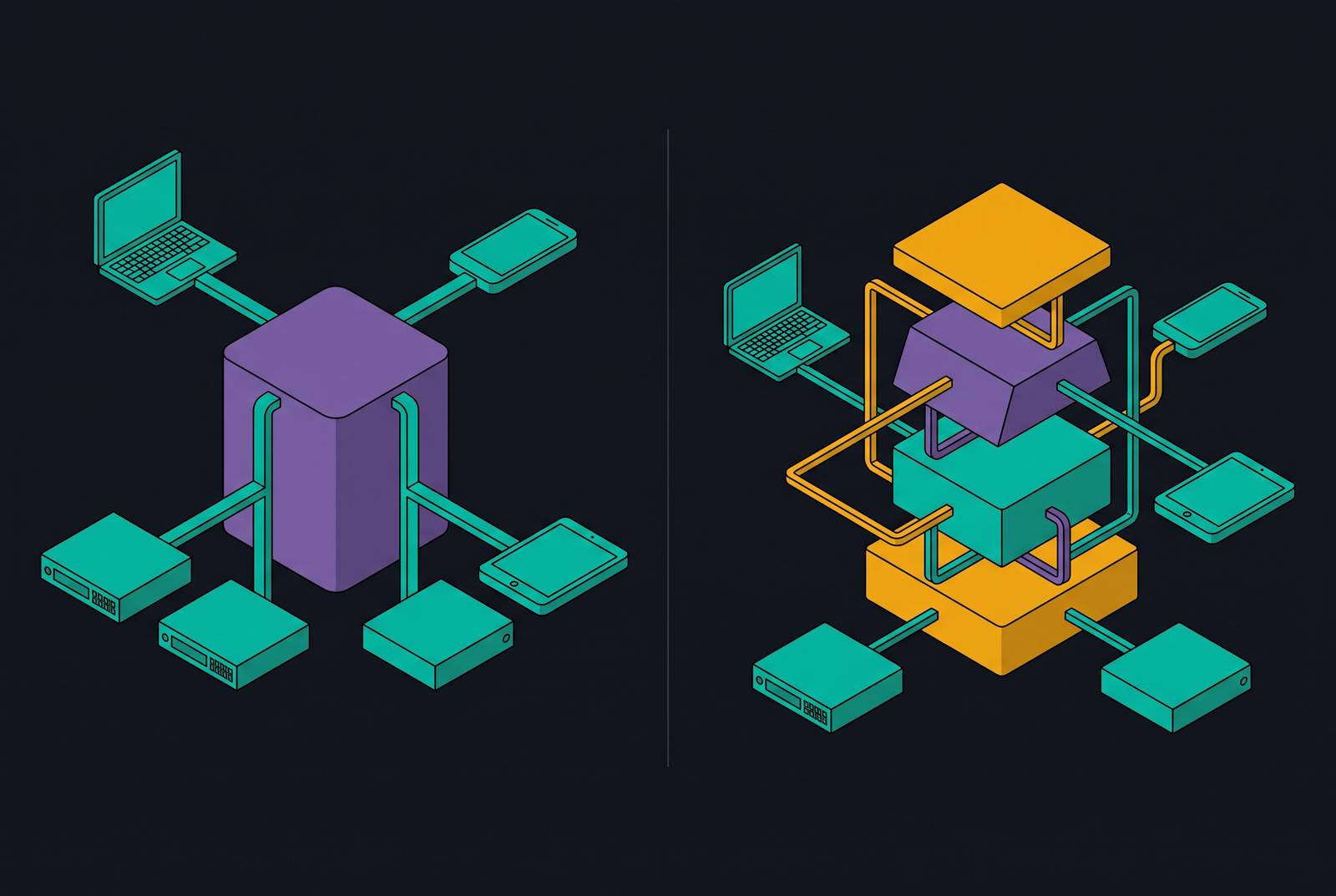
UEM is not antivirus. It's not a SIEM, and it's not a full security stack, even though vendor marketing sometimes blurs that line on purpose. At its core, UEM is one console for enrolling devices, enforcing policy, pushing patches, distributing apps, and checking compliance across every platform an organization runs, from Windows and macOS to iOS, Android, and increasingly Linux and ChromeOS.
The coverage spans the full device lifecycle: onboarding a laptop the day it ships to an employee, through retirement when that laptop gets wiped and reassigned or scrapped. Inside that lifecycle, a few jobs do most of the work. Device security and compliance checks handle encryption enforcement, remote wipe, password policy, and vulnerability scanning. Automated patch management closes the gap between a patch's release date and the day it actually reaches every machine in the fleet, a gap that in a manual process can stretch for weeks. Zero trust integration lets UEM pass device posture signals to identity and access systems, so a device can present valid credentials and still get denied access if it fails a compliance check. And audit trails from policy enforcement give compliance teams a paper trail without someone building one by hand in a spreadsheet at 11pm before an audit.
Where UEM stops matters just as much. Threat detection and response, network security, identity governance, and email security all sit outside its boundary. UEM is the management and compliance foundation, not the perimeter, and any vendor that implies otherwise is stretching the term.
That boundary is getting blurrier, though. Platforms like ManageEngine Endpoint Central now bundle patch management, EDR, vulnerability management, DLP, and application control into a single agent, which is a meaningfully different animal from traditional UEM. Buyers evaluating "unified" platforms need to ask exactly what's unified, because the word now covers a much wider range of products than it did five years ago.
How a best-of-breed stack is actually assembled and managed
Best-of-breed means picking the strongest specialized tool for each job: a dedicated MDM, a separate EDR, a standalone patch manager, an independent vulnerability scanner, its own identity provider. Each piece is purpose-built and often the strongest option in its category, which is exactly why regulated enterprises have leaned on this model for years. It gives them fine-grained policy control and spreads risk across vendors instead of betting everything on one.
Day to day, though, it looks nothing like the sales pitch. Multiple consoles, each with its own alert queue. Manual correlation whenever an event in one tool needs context sitting in another. Separate renewal cycles, separate vendor relationships, separate support escalation paths to keep straight. And underneath all of it, integration work, often hand-scripted, just to get data moving between tools that were never built to talk to each other.
IDC analyst Dickson frames the fit precisely: best-of-breed suits emerging technology use cases and operational technology environments with narrow, specific security controls, not general-purpose IT operations. That's a real qualification, not a footnote, and it cuts against how the model gets sold. The concentration-risk argument for point solutions is legitimate too: spreading tools across vendors means a single platform outage doesn't cascade through the whole stack, and recent high-profile outages at major providers have made that risk feel less abstract.
But the model carries a staffing assumption most lean teams simply can't meet. Running a best-of-breed stack well takes either dedicated integration expertise (scripting, API work, the whole plumbing job) or a security engineer who can operate several complex tools at once. A generalist IT lead juggling five other responsibilities isn't that person, and pretending otherwise is exactly how the gaps start.
The operational costs that don't appear on the vendor invoice
A 2025 survey of more than 1,000 IT and security professionals found that 49% struggle with too many overlapping tools, and 41% face direct security risks from poor integration between them. The same survey found that teams managing 16 or more tools report burnout rates of 50%, against 17% for teams running just one to five. That's not a minor productivity complaint. It's a staffing risk that compounds the security risk.
Alert fatigue is the mechanism that connects tool sprawl to missed threats. Per the Microsoft/Omdia State of the SOC 2026 report, organizations manage an average of 10.9 security consoles, each pushing out its own stream of alerts. The same report found a large share of all alerts turn out to be false positives, meaning close to half of an analyst's workload produces no security value at all. When alert volume climbs high enough, the real signals get buried in the noise. Google Cloud Security's M-Trends 2025 report found attackers sit inside an environment for a median of 11 days before anyone catches them, and eleven days is plenty of time for lateral movement, data staging, and whatever comes next.
Every connection between point solutions carries an ongoing tax, too: API changes, version bumps, a vendor quietly deprecating an endpoint without much warning. Each of those events opens a small gap. And when a device behavior shows up in the EDR, a patch gap shows up in the vulnerability scanner, and a policy violation shows up in the MDM, somebody has to sit down and connect those three dots by hand. In a unified platform, that correlation happens on its own. For a team without a dedicated analyst, the gap between manual and automatic correlation isn't a matter of convenience. It's often the difference between catching a threat and missing it.
Where the unified platform model has real limits
Concentration risk cuts both ways. Consolidate onto a single platform, and a platform outage, a vendor breach, or a sudden licensing change hits everything at once, not just one corner of the stack. Given recent high-profile incidents at major providers, that's not a hypothetical worth waving off.
Depth is the other limit, and it's the one vendors talk about least. A unified platform's patch management or threat detection might be strong enough for most environments, but it won't necessarily match a dedicated, purpose-built tool for an organization with genuinely specific requirements.
Microsoft's Intune is a useful, specific case. Its depth is strongest on Windows, and while macOS, Linux, iOS, and Android are all supported, none of them reach Windows-level feature parity. Linux is the weakest of the group, with more limited support than the other platforms. DLP support runs deepest for Microsoft's own Office file formats, so organizations handling sensitive data in other formats should expect to hit walls.
Pricing adds another wrinkle. Microsoft 365 E3 and E5 pricing has climbed in recent cycles, and enterprise agreement volume discounts were cut effective November 2025. For organizations that leaned on those discounts, the real cost increase can run well past the headline percentage, which makes modeling the full licensing cost before the next renewal a non-optional step for anyone anchoring their architecture to Intune.
Lock-in is the quieter cost. The deeper an organization consolidates into one vendor's ecosystem, the higher the switching cost climbs over time, and that's a real consideration for anyone who wants to keep architectural options open. Platform consolidation solves a genuine operational problem. It doesn't erase risk so much as trade one risk profile for another, and that trade needs planning, not an assumption that it goes away on its own.
The hybrid middle ground and when it makes sense
Plenty of organizations land somewhere in between: unified management for the endpoint and device layer, with specialized tools kept in place wherever real depth is required. IDC's Dickson recommends consolidating by domain instead of migrating an entire stack in one move, starting with endpoint security because it delivers the fastest operational win, then expanding into network and other domains from there.
Cybersecurity Mesh Architecture (CSMA) gives this approach a name and a structure. Instead of ripping out existing tools, CSMA overlays them with a shared intelligence and policy layer. Three pieces make it work: a security analytics layer that pulls in threat signals and applies risk scoring in real time, centralized policy management that standardizes enforcement across domains, and one operational dashboard that pulls monitoring into a single place instead of many separate consoles. Done well, this lets an organization keep its best-of-breed investments in the domains where they earn their keep, while closing the alert-reconciliation and visibility gaps that fragmentation creates.
None of that happens by accident, though. The hybrid model still needs a deliberate integration architecture sitting under it. If the integration stays informal or undocumented, the underlying problem doesn't go away, it just gets relabeled. For a lean team, CSMA is a reasonable place to end up eventually. It's a poor starting point, because it assumes exactly the integration muscle that lean teams tend not to have yet.
How to map your organization's actual operating constraints to the right architecture
A handful of variables decide this, and they matter more than any feature checklist. Headcount comes first: how many people actually own security operations, and how much of their week is left over for tool management once threat response takes its cut? Device fleet composition matters next. A shop running Windows end to end has different needs than one juggling macOS, Windows, iOS, and Android, and platform coverage gaps in a unified tool bite harder as the fleet gets more mixed.
Compliance requirements push toward consolidation more often than not. Common compliance frameworks tend to require unified audit trails and consistent policy enforcement, and a fragmented stack turns audit prep into a manual slog every single cycle. Integration expertise on staff is the honest constraint sitting underneath all of it: does anyone on the team have the scripting and API skills to build and maintain connections between point solutions, and the time to keep them current when a vendor changes an endpoint without warning? Growth trajectory matters too. A 20-person company with a simple fleet has different needs than a 200-person company juggling contractors, remote staff, and BYOD, and the architecture that fits today may not fit in eighteen months.
A few signals point clearly toward consolidation: more than three separate tools generating separate alert queues, no dedicated security analyst on staff, compliance prep that drags every cycle. Other signals point toward keeping best-of-breed pieces in place: a specific regulatory or OT requirement that no unified platform meets, or an existing point solution that already works well and integrates cleanly. And some situations call for a phased hybrid, particularly a large existing stack with real institutional knowledge built up around specific tools, a willingness to invest in integration work, and a 12 to 24 month runway to consolidate domain by domain.
Before any vendor evaluation starts, one question settles most of the rest: how much of the team's capacity should go toward managing tools, versus toward the actual work those tools exist to protect?
What the current UEM vendor landscape looks like for organizations evaluating options
The UEM market sits in the multibillion-dollar range with strong growth behind it, though analyst estimates vary a lot depending on how the category gets defined. Treat any market-size figure as a directional signal of where vendor money is flowing, not a precise benchmark. One notable data point: a notable funding round in early 2025 signaled continued investor interest in the UEM space.
The vendor field breaks down fairly cleanly by use case. Miradore is cloud-based, was named a worldwide UEM leader in the 2024 IDC MarketScape, and was the only vendor to earn full marks from GigaOM in both the SMB and MSP segments. It partners with Google Zero-Touch Enrollment and plugs into Apple Business Manager, and it offers a free plan, which makes it a strong fit for smaller teams that need cross-platform coverage without enterprise-level pricing.
Microsoft Intune offers the deepest tie-in to the Microsoft 365 ecosystem and is strongest on Windows, with macOS and mobile support present but carrying the feature gaps described above; it fits best for organizations already standardized on Microsoft infrastructure, and poorly for anyone who isn't. IBM MaaS360 brings AI-assisted management across mobile and desktop from one platform, aimed at enterprise buyers. ManageEngine Endpoint Central folds endpoint management and endpoint security into one agent (patch management, EDR, vulnerability management, DLP, and application control), available in both cloud and on-premises versions, worth a look for teams that want security and management pulled together further than a typical UEM goes.
Hexnode UEM spans laptops, mobile, IoT, and kiosk devices, and shows up in the IDC MarketScape 2025/26 and the 2026 Gartner Magic Quadrant for Endpoint Management Tools. Omnissa Workspace ONE covers every major OS at enterprise scale, though it's often flagged for messy, hard-to-predict pricing. BlackBerry UEM offers high-assurance, government-grade device management, best suited to regulated environments with sovereign data requirements.
For teams without a dedicated security function, the practical evaluation criteria are narrower than the feature list suggests: how fast the thing deploys, whether managed service support exists, and whether the platform actually removes the need to hire a security specialist just to run it. Zip Security, for instance, is built for companies that have no dedicated security team and need to evaluate and deploy security tools without expert guidance, a focus that led CyberSecurity Breakthrough to select it as the 2026 SMB Cybersecurity Solution of the Year. That's the operational problem this whole piece has been circling, and it's the one worth solving for first, ahead of any feature comparison chart.
The broader consolidation trend is already well established at the enterprise level. Per Gartner, a large majority of organizations were actively pursuing security vendor consolidation as of the early 2020s, and that trend has only picked up speed since. SMBs and mid-market companies are following the same path now, pushed by the same operational pressures, just at a smaller scale and usually a few years behind.