Endpoint Compliance Gaps in Remote and Hybrid Workforce Models
Traditional security tools built for office networks now fail silently across remote devices.
Endpoint compliance breaks down in hybrid and remote teams for one reason: the tools built to enforce it were never designed to reach devices that don't come back to the office. Firewall inspection, on-premises patch servers, network-based data loss prevention tools. All of it was built around a single assumption: that laptops would regularly plug back into the corporate network, where IT could check them, patch them, and watch their traffic. That assumption has quietly stopped being true for most companies.
Over 70% of knowledge workers now work in hybrid or fully remote arrangements, a 2026 analysis found. A remote laptop isn't less secure just because it sits outside a downtown office. The controls meant to protect them just can't get to them anymore. A laptop sitting in a spare bedroom runs the same operating system, the same browser, the same risk profile as one sitting at a desk in headquarters, but nobody's watching it the same way.
That gap appears on the compliance dashboard as a timing problem. What IT sees when it checks a device's status is a snapshot: the last time that machine phoned home, reported its patch level, confirmed its encryption was on. It's a photograph from last Tuesday, not a live feed. A device can look fully compliant on paper while running three unpatched vulnerabilities and a disabled antivirus client in the real world, and nobody finds out until the next check-in, if there is one.
None of this required a new kind of attack. Credential theft, vulnerability exploitation, malware delivery: these are the same techniques that have worked for years. What changed is the terrain they operate on. Attackers now have a fleet spread across home networks, personal phones, and cloud apps that IT often doesn't even know employees are using until a device finally checks back in. Hybrid work didn't invent new threats. It gave old ones far more room to work.
Enforcement infrastructure breakdown beyond the perimeter
Every layer of traditional endpoint security needs the device to sit near the corporate network, if not physically then through a steady VPN tunnel. Pull that device away for good, and each layer fails on its own terms, quietly and separately, because every layer depends on the device being near the corporate network.
Patch management shows the pattern most clearly. When software updates get pushed through a VPN connection or an on-premises server, a laptop that rarely connects to either falls out of its patch schedule fast. Weeks, sometimes months, go by. Third-party software makes it worse: programs outside the core operating system rarely get consistent patching coverage even when a device sits in the office, and remote work removes what little oversight existed.
Data loss prevention tools watch network traffic, so they hit that same wall. When a device connects straight to a cloud service over home broadband, that traffic never reaches a network-layer DLP tool. If there's no DLP control running on the device itself, an employee can move a sensitive customer file to a personal cloud storage account, and that triggers zero alerts at corporate headquarters.
Many organizations tried to patch this by leaning harder on VPNs, treating the VPN as a new perimeter. That move creates its own problem. A VPN appliance that misses a patch, or a VPN login protected by a stolen password instead of phishing-resistant multi-factor authentication, hands an attacker access to the entire network. That's a much bigger blast radius than a compromised cloud login would produce on its own. VPNs without phishing-resistant MFA sitting in front of them represent one of the largest structural weaknesses in a distributed company's setup.
Home networks don't make up the difference. Consumer routers rarely get firmware updates. They also share bandwidth with other connected devices, and those often ship with weak default security. There's no corporate-grade traffic inspection watching what comes in or out. The laptop is now operating inside a network IT can't see into and can't control, full stop in terms of what tools reach it.
The six surfaces where compliance gaps concentrate in distributed teams
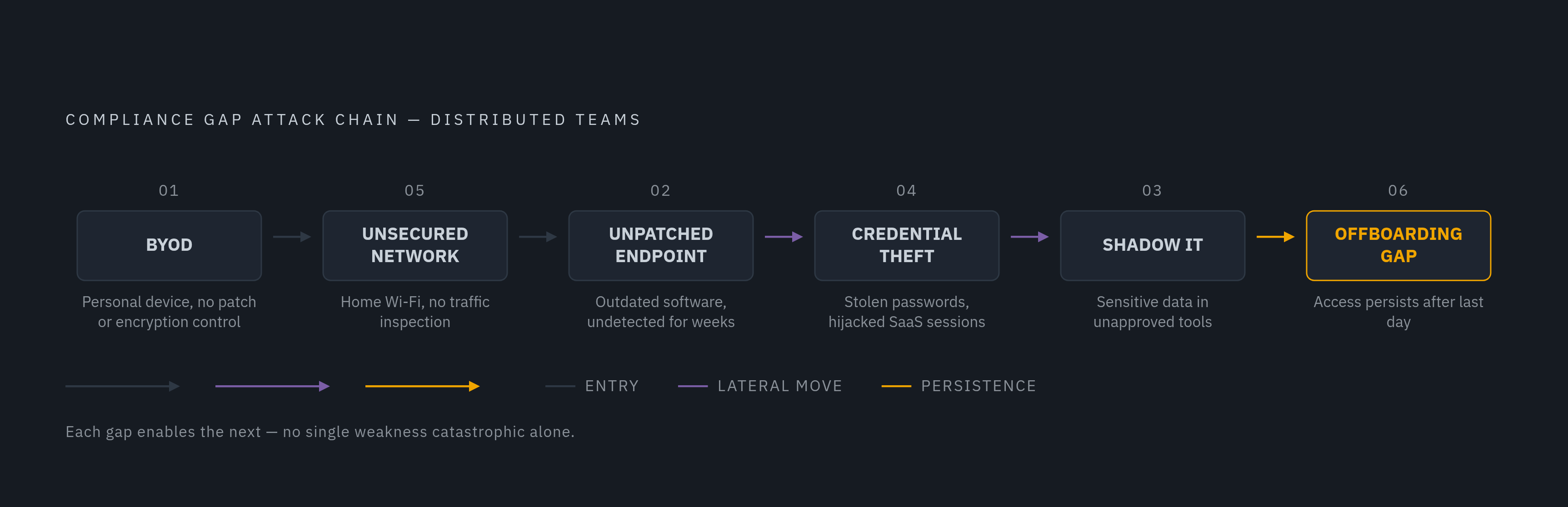
When the old enforcement model loses its grip on a device, the gaps it leaves don't spread evenly across the fleet. They concentrate at six specific points, and distributed work makes every one of them worse.
Personal devices used for work, known as BYOD, make up the largest blind spot of all. When an employee logs into company email or a cloud app from a personal laptop or phone, that device has no guarantee of current patches, encryption, or endpoint detection software. If that personal device gets compromised, the attacker inherits everything that employee's account can reach, and IT has no window into any of it.
Unpatched endpoints come next. Office environments have a natural rhythm that catches outdated software: IT walking the floor, scanning the network, noticing a machine that's overdue for an update. Remote work removes all three of those checkpoints. A laptop can run outdated, vulnerable software for weeks without anyone noticing, and that gives attackers a dependable way in.
Shadow IT grows fastest where approved tools create friction. When the sanctioned file-sharing system feels slow or clunky, employees route around it, and they sometimes don't realize the risk. Sensitive data gets copied into public AI chat tools through browser extensions nobody on the security team approved, and that skips every data classification rule the company has in place. The real damage here is that this movement of data happens invisibly: nothing about it trips a corporate alert.
Credential theft carries the heaviest weight of all six. Remote employees depend on browser logins and SaaS portals for nearly everything they do, and each one is a separate door an attacker can try. 2026 data on remote work security names identity abuse, stolen passwords and hijacked login sessions, as one of the highest-impact ways attackers break into distributed teams. Phishing emails written by AI tools no longer carry the typos and broken grammar employees were trained to spot, so these campaigns succeed more often than the phishing attempts of a few years ago.
Unsecured home and public networks round out the physical layer of risk. A coffee shop Wi-Fi network or a home router shared with a dozen other devices gives an attacker a direct line to intercept traffic from a laptop that IT has no way to monitor.
Offboarding gaps close the list, and they carry outsized risk for a short window. When a remote employee leaves the company, especially in a region with no local IT staff to grab the laptop back that afternoon, the time between their last day and full revocation of access is one of the most dangerous stretches in the entire compliance picture. The longer access stays open, the more days data has to walk out the door.
Why these gaps compound in hybrid teams
None of these six surfaces is catastrophic by itself. The real danger is what happens when they line up. A gap in one surface rarely stays contained. It links to the next one and builds a path an attacker can walk straight through.
Picture a personal laptop (the BYOD gap) connecting over a home network (the network gap) while running outdated software (the patching gap) with no endpoint detection installed. Each weakness feeds the next: compromising the device is only step one, and the missing detection tool is what lets the attacker move without anyone noticing.
Speed is what makes this chain so dangerous. 2026 data on remote work security shows that once an attacker compromises a remote worker's identity, they can reach email, customer records, source code, cloud files, internal tools, and connected SaaS platforms without ever touching a traditional office network. The attacker moves through identity and application layers instead, and the old network-based security tools were never built to watch there.
Regulatory frameworks don't bend to accommodate any of this. PCI DSS, HIPAA, GDPR, SOC 2, and NIST SP 800-171/CMMC still expect the same standard of control regardless of where a device sits. What gets harder is proving compliance, since distributed work stripped away the kind of continuous monitoring that made proof straightforward in an office-based model.
That turns what looks like a simple patching delay into something bigger: an inability to produce evidence. A company that can't show continuous enforcement across its fleet fails an audit on that basis alone, whether or not an attacker ever got in. The breach is one risk. The inability to prove the fleet was ever under control is a separate, and in some cases more immediate, one.
Continuous compliance requirements without a perimeter
So you fix this by moving enforcement off the network and onto the device itself, and you trade periodic check-ins for monitoring that never stops.
Zero Trust Network Access, usually shortened to ZTNA, replaces the VPN model by checking every single access request on its own merits: who the user is, what device they're using, whether that device currently meets policy. No one gets network-wide access just because they typed in the right password. ZTNA, continuous endpoint detection, and device-based DLP form the foundation a company needs once it stops relying on network location as a proxy for trust.
Continuous Endpoint Detection and Response, or EDR, solves the problem of stale, point-in-time snapshots. Rather than waiting for a device to reconnect and report its status, EDR watches the device's behavior all the time and produces a live compliance signal no matter where that device happens to be connected.
Device-resident DLP picks up where network DLP leaves off. Because the control runs on the machine itself rather than watching network traffic, it fires the same way whether the laptop sits in a conference room or on a kitchen table connected to home broadband.
Unified Endpoint Management, or UEM, ties these pieces together into one coherent view. By combining device management, policy enforcement, cloud-based patching, and compliance reporting into a single system, a UEM platform gives IT the continuous view of the fleet that distributed work otherwise takes away.
Identity now functions as the boundary that the network perimeter used to be. 2026 security data makes the point directly: remote work risk is no longer mainly about home Wi-Fi. It spans identity, device, browser, SaaS, and cloud access all at once. Access decisions need to check a device's compliance status at the moment someone logs in, rather than assuming that status because the login came from a trusted network.
Patch management needs to move to the cloud as well, delivered without depending on a VPN tunnel or an on-premises server. That's the only way remote devices stay current regardless of how rarely they touch the corporate network directly.
Where to start with a distributed fleet
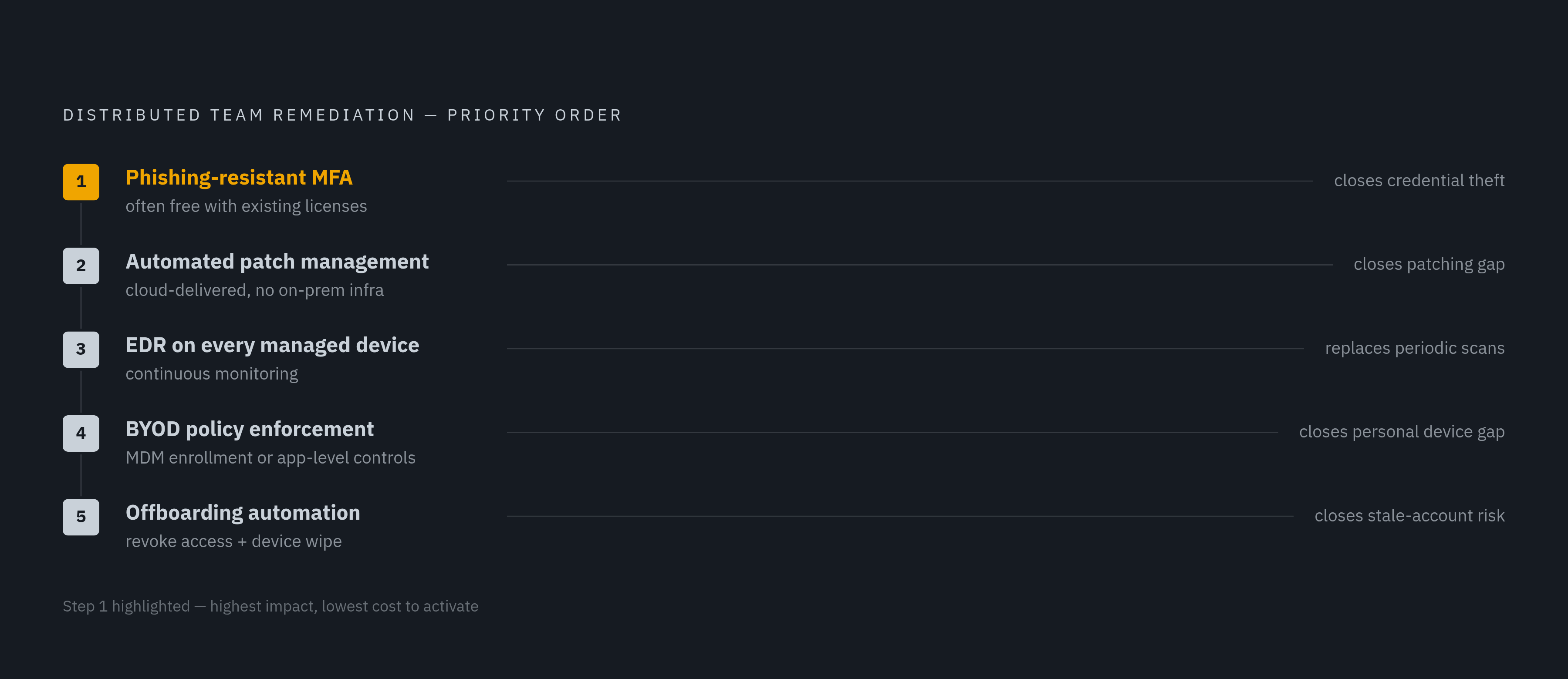
If a company has no dedicated security team, it can't fix all six surfaces in one afternoon. The gaps need to close in order of impact, starting with the ones attackers reach for first.
Multi-factor authentication comes first, and it needs to be the phishing-resistant kind specifically. This single move closes the credential theft surface that 2026 data points to as one of the highest-impact paths into remote identities. Turning on basic MFA often costs nothing, because you already have the capability inside most of your software licenses. If you want full phishing-resistant enforcement, you usually have to pay for a Conditional Access tier, such as Entra ID P1, or hand out hardware security keys.
Cloud-delivered, automated patch management comes next. It fixes the patching gap without asking devices to connect to on-premises infrastructure first, and it closes off the single most reliable way attackers get into remote machines.
Endpoint Detection and Response deployed across every managed device, including enrolled personal devices where that's possible, replaces the old periodic network scan with monitoring that never stops. That turns a stale snapshot into a live compliance signal.
BYOD policy enforcement comes next on the list. At minimum, you need to require mobile device management enrollment before a personal device gets access, or you set application-level controls for devices that can't be fully enrolled.
Offboarding automation closes out the list: revoking access and triggering a device wipe the moment someone's employment ends, not days or weeks later. This shuts the highest-risk window in the compliance picture: the stretch between a departing employee's last day and full revocation.
For a small IT team, running five separate tools from five separate vendors just recreates the same coordination problem that distributed work already causes. Every handoff between systems is another place for a gap to open. A platform that combines device management, endpoint security, identity protection, and compliance automation in one place removes those seams. Platforms built for companies without a dedicated security team deploy in roughly two weeks, so a lean IT staff doesn't have to stitch five vendors together by hand.