MDM and EDR Without a Security Hire What a Fifty-Person Company Should Run Today
Small companies need managed EDR with overnight staffing to actually use endpoint alerts.

A fifty-person company with no security hire needs mobile device management to keep its devices configured and patched, and managed endpoint detection and response to watch for attacks and contain them. The right setup includes software that sends alerts and people who respond overnight. A unified device, endpoint security, and compliance console can reduce administration, but it cannot replace that staffed response.
Why fifty-person companies are the preferred ransomware target, not just a likely one
A fifty-person company has enough data and revenue to reward an attacker, but often no dedicated security function to make an intrusion difficult. That is an attractive trade for the attacker. Verizon’s 2025 DBIR found ransomware involved in the vast majority of small and mid-size business breaches, more than double the rate at large enterprises.
Large enterprises have layered controls, networks divided into separate segments, and security operations centers that watch around the clock. A smaller company often has antivirus, shared passwords, and an overworked IT generalist. Cloud apps and remote access widen that gap. When the network has few internal boundaries and nobody watches alerts overnight, the weakness is not just the budget but the absence of anyone assigned to respond.
What EDR and MDM each actually do, and why they solve different problems
Mobile Device Management, or MDM, controls the device itself. It enforces disk encryption, pushes operating system patches, applies settings, and allows a lost or stolen device to be wiped remotely. Its job starts before an attack does. MDM provides prevention and compliance controls, but it does not tell the company what a threat is doing once it starts running.
Endpoint Protection Platform, or EPP, is the modern successor to antivirus. It combines signature matching with machine-learning analysis to block known and obvious threats before they run. Endpoint Detection and Response, or EDR, watches device behavior for signs of an attack that got past prevention. It records a timeline and gives a responder tools to isolate the machine and reverse damage. EDR therefore needs someone who can make sense of what it finds.
Managed Detection and Response, or MDR, adds that person. More precisely, it adds a staffed security operations center, or SOC, that monitors alerts continuously and responds on the company’s behalf. The service may also check signals from networks, cloud systems, and identities for signs of an attack. MDM and managed EDR solve different problems, because a patched, encrypted laptop can still be attacked, while detecting an intrusion does not enforce its device settings.
Why buying EDR without a plan to watch it is the most common mistake at this size
Self-managed EDR without a staffing plan becomes an expensive dashboard nobody reads. The software can generate alerts continuously, but someone qualified must sort them, investigate suspicious activity, and decide what to do. Watching only during business hours leaves no one to watch after closing time. Around-the-clock staffing has to cover shifts, weekends, leave, sickness, and departures, which puts it beyond a realistic security hiring plan at this size.
The IT generalist cannot take on that work just by opening another browser tab. Alerts pile up while other requests compete for attention. Investigations call for expertise that ordinary device administration does not provide, and attackers do not wait for the office to open. The company therefore needs to establish who reads the alerts at 3 a.m. on a Sunday, and what happens next.
A managed contract can still leave that question unanswered. If the provider must phone for approval before isolating a device, an unanswered call can stall containment. Ask every provider in writing which actions its analysts can take without approval, and at what hour. The company should look closely at the response agreement before it looks at the detection engine.
The priority order for a fifty-person company spending its first security dollars
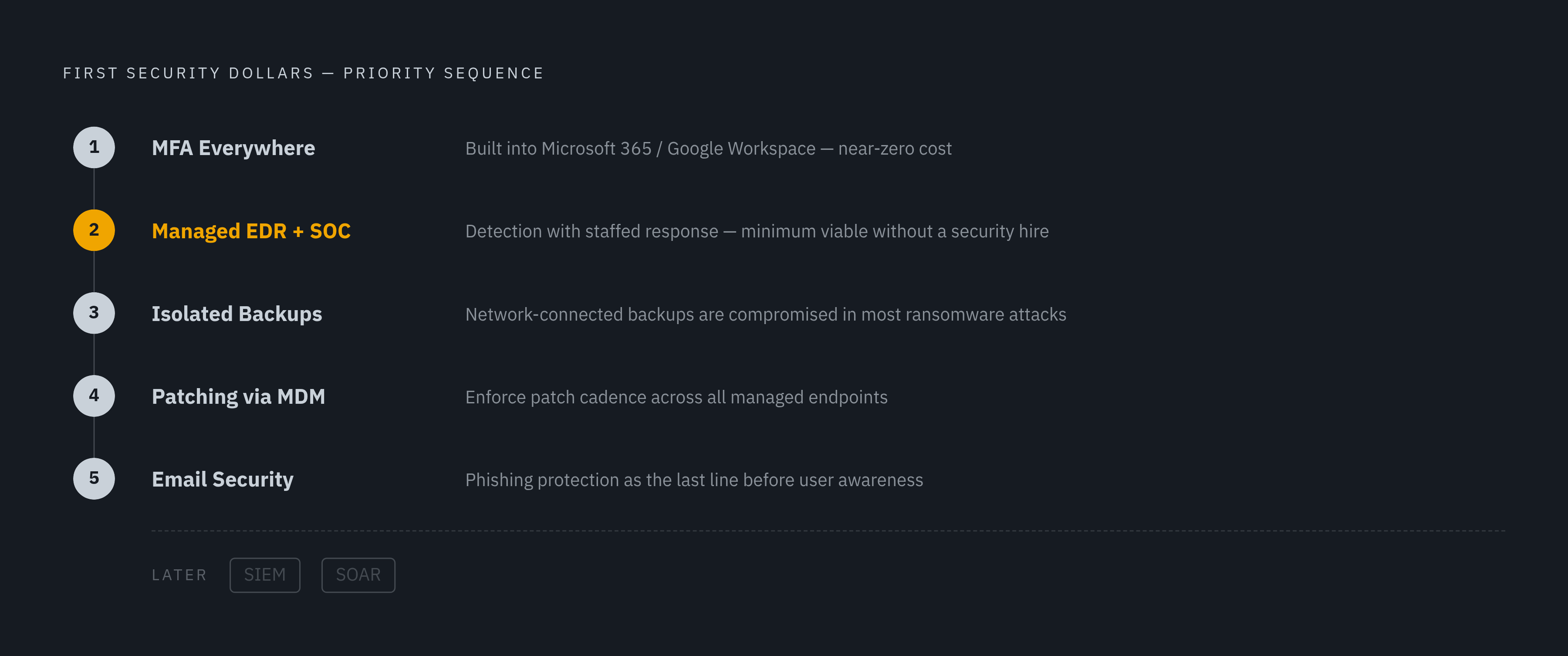
The first dollars should address missing fundamentals. Start with multi-factor authentication, or MFA, everywhere. It is the control that prevents the majority of small-business account-takeover breaches, and it is built into Microsoft 365 and Google Workspace at near-zero marginal cost. Enable it before other security spending so that a password is not the only barrier to an account.
Managed EDR comes next because it adds both detection and the labor needed to act on it. Cyber-insurance requirements, SOC 2 audits, and ransomware exposure have made EDR a must-have at this size. The managed layer is not a luxury here. Without a security hire, it is the minimum viable operating model.
After detection comes the ability to recover. Backups connected to the main network are compromised in many ransomware attacks, so the next priority is isolated backups whose recovery has been tested. Next comes patching and checking that it worked, with MDM making sure updates are applied because people do this work inconsistently by hand. Email security with phishing protection comes next because email remains the primary delivery route for the initial access EDR is designed to catch.
The company can wait to buy large platforms for security data and response-automation. SIEM platforms collect and analyze security information, while SOAR platforms coordinate and automate response work, but both require skilled operation. Splunk requires dedicated staff, and the cloud-native Sentinel still needs skilled resources or an outsourced SOC. Managed EDR with included SOC monitoring covers the high-value uses at far less complexity for this company.
MDM options a fifty-person company can realistically deploy and run
The MDM decision starts with the existing software stack and the person who will administer it. Microsoft Intune deserves the first look for companies already paying for Microsoft 365 Business Premium, because it is bundled with that suite. That makes it a zero-marginal-cost starting point. It covers Windows, macOS, iOS, Android, and Linux, with encryption enforcement, patching, and conditional access policies.
Intune still needs configuration before it is useful. It is not plug-and-play, though an IT generalist can learn the basics without specialist training. Cisco Meraki Systems Manager is another realistic option for mixed-device environments, especially where Meraki networking is already installed. Its integration with that networking stack can fit the existing workflow, while a company outside that environment takes on additional cost.
Confirm full-disk encryption enforcement through FileVault on Mac and BitLocker on Windows, remote wipe, operating system patch enforcement, and compliance reporting. Conditional access is the other key capability. It can block a device from company resources when the device fails the required checks, rather than merely recording that it is out of compliance.
Which managed EDR can a fifty-person company run without a security hire?
The shortlist should separate services that include analysts from detection products that need a managed layer added. Cost comparisons alone will blur that distinction. Before a demo, establish who watches overnight, what they can do without approval, and whether the purchased tier includes ransomware rollback and network isolation. Ask how long evidence is kept, too, because it may be gone before anyone notices an incident if it is kept for only a few weeks. The NCSC says important logs should be kept for at least six months.
Microsoft Defender for Business is the strongest value starting point for companies already on Microsoft 365, provided they add managed monitoring. Its published pricing is per user, covers up to five devices each, and has no minimum device requirement. It is self-managed by default. Microsoft’s documentation assigns alert review and action to an internal security team, so a company without that team needs someone else contracted to do the work.
ESET PROTECT lets the company keep detection and managed monitoring in the same product family. Its MDR tier packages the detection engine with SOC coverage through a license-level upgrade. The published price is per device and is a fit for a fifty-person company.
Sophos MDR fits a company that wants a clear handoff of alert handling. Its analysts sort alerts, investigate suspicious activity, and contain threats, so the IT generalist does not have to interpret behavioral detections. Published pricing is per device, but the managed service is a separate subscription. Buying Sophos Endpoint alone does not include that service, which makes the subscription boundary an important part of the purchase.
Malwarebytes ThreatDown Elite offers another direct managed route. The Elite tier has analysts who watch around the clock, with a published price per device. Its simpler console reduces the operational burden on the IT generalist managing the provider relationship.
Bitdefender GravityZone belongs in the comparison as a self-managed option. Of the self-managed choices here with a published price per device, it costs the least, and it passes AV-Comparatives EPR 2025 certification. It fits only if technical IT staff work in the console. For a company with nobody assigned to security monitoring, the lower software cost does not close the staffing gap.
An integrated platform can complement the selected endpoint service by combining device management, identity protection, and endpoint security in one console. That can simplify compliance reporting and reduce vendor coordination. It is a different benefit from overnight response. The company still needs the managed service’s responsibilities to be explicit, even when the controls appear together on one screen.
What a combined MDM and managed EDR stack looks like in practice for a fifty-person team
In the running stack, MDM enrolls laptops, desktops, and mobile devices, enforces encryption, pushes patches, and allows remote wipe. Once configured, much of that work runs automatically. The managed EDR agent sends device behavior data to the provider’s SOC, where analysts look into threats and contain them within the limits the company and provider have agreed on. MFA protects cloud applications, VPN access, and administrator accounts, addressing credential attacks that device controls alone do not stop.
The IT generalist handles onboarding and employee departures. New devices are added to MDM, while employees who leave are removed. The IT generalist also gets incident notifications and decides whether to approve actions the provider recommends that go beyond its agreed autonomous-response threshold. Monthly compliance reports provide a way to review patch levels and encryption status. Under the contract, the service provider still has to look into alerts and watch overnight.
A shared console or unified compliance dashboard reduces the work between those duties. The IT generalist has fewer separate systems to coordinate when device status, endpoint security, and reporting come together. For a lean team, that administrative saving has practical value. The point of integration is not to replace the analysts but to make the company’s remaining work manageable.
Encryption status, patch compliance, incident logs, and response documentation are records requested by SOC 2 assessors, cyber-insurance underwriters, and PCI DSS auditors. A properly configured stack produces those records as part of normal operation. That makes evidence collection a byproduct of running the controls, rather than a separate effort to reconstruct what happened.
What the managed service does not cover, and what the company still owns
The company still owns decisions about who may access its systems. Auditing or revoking application permissions when someone changes roles or leaves requires an owner and process separate from MDM and EDR. Employee awareness remains a company responsibility too, because phishing is still an entry point, and training complements technical controls.
The response contract also has a business boundary. Analysts can detect and contain threats within agreed limits, but someone inside the company must decide whether the business can accept a disruption they recommend. Taking a system offline can become a business continuity decision. Agreeing on that boundary before an incident keeps the provider’s authority clear without pretending every decision can be outsourced.
Vendor risk and backup testing sit outside the endpoint service as well. Protecting the company’s devices does not extend that protection to third-party vendors with access to its systems. Nor does the stack prove that backups are intact and recoverable. The company must own those checks separately, rather than treating a healthy endpoint dashboard as evidence that recovery will work.
Before signing, the company should verify the exact division of responsibilities with the provider. The managed service takes on the hardest work to staff internally, while a founder, operations lead, or IT generalist can own the remaining responsibilities without becoming a security specialist. Security at this size is a program. With device controls, staffed response, and clear ownership of the remaining tasks, a fifty-person company can run it without a dedicated security hire.
Sources
- Best EDR for Small Business: A Buyer's Guide to Endpoint Security | Zip Security
- What Is Mobile Device Management (MDM)? | Zip Security
- Identity Access and Device Management: A Simple Model for Modern SMB Security | Zip Security
- Building a Culture of Security Consciousness: Getting a Security Program off the Ground as a 'Department of One' | Zip Security