Remote Work Endpoint Attack Surface Expansion
Disconnected employees create security gaps attackers exploit first.
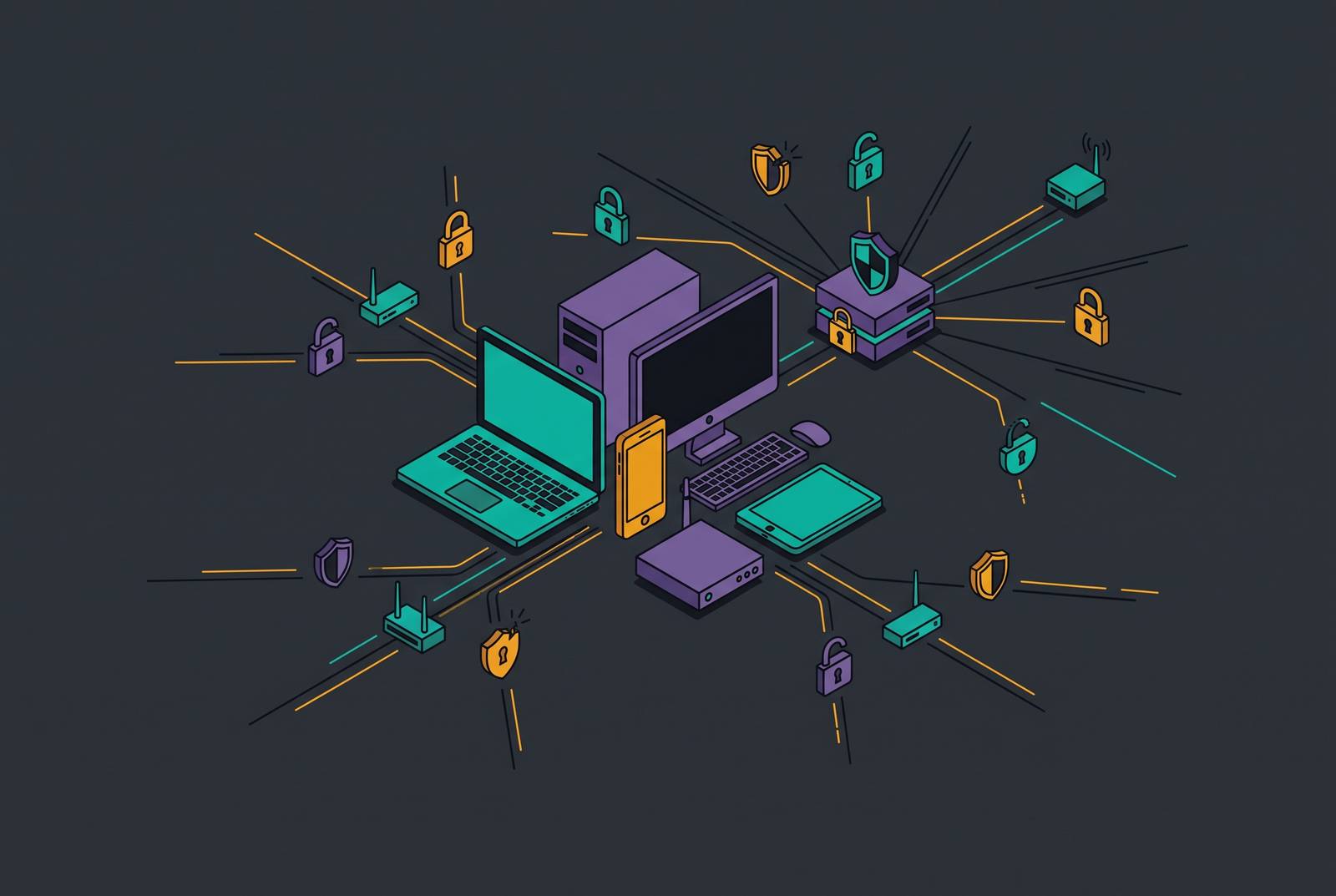
An employee opens a laptop in a hotel lobby, logs into the company's finance system over the hotel Wi-Fi, and keeps working. Nobody questions this anymore. But that one login just passed through a network nobody at the company has ever inspected, on a connection with no firewall, no monitoring, and no physical access control behind it. The office used to provide all three automatically. Once traffic left the building, there was no office left to protect it.
In the old model, security assumed a boundary. Employees sat inside a managed network, behind firewalls, under cameras and badge readers, and the job of defending the company was mostly a job of defending that boundary. Remote work broke that model's core assumption: every employee connection now starts from a network the company doesn't control, often a home router running on factory-default credentials with no segmentation between the work laptop and the smart TV, the kid's tablet, and whatever else sits on the same connection.
This isn't a temporary condition that resolves once offices fill back up. Hybrid and remote work is the operating model now, not a pandemic-era workaround still waiting to expire. A 2026 survey found that 92% of IT professionals say remote work increases risk, and that number reflects a permanent shift in how companies operate, not a passing phase. The perimeter is not coming back.
What replaced it is identity. Security now depends on knowing who is accessing a system, from where, on which device, and with what strength of authentication behind the login. That shift, from a network boundary to an identity boundary, is the structural change everything else in this piece builds from.
Attack Surface and Entry Points
The perimeter didn't get replaced by a single new wall. It got replaced by a sprawl of separate entry points, and each one needs its own defense because each one can be the one that fails.
Start with devices. Corporate laptops, personal phones used for email, tablets, the home desktop someone used last week because their laptop battery died, all of them touch company data at some point, and all of them count as attack surface. Managed IT has to set a minimum security bar for every device that touches company systems, whether the company owns it or not. Personal devices are the riskiest of the group, because IT typically has no visibility into what's installed on them, whether they're patched, or whether they were compromised before they ever connected to a work account. If you don't back it up with mobile device management or unified endpoint management tooling, every personal device connecting to a business app becomes a variable nobody is tracking.
Then there's the network layer. Home routers, shared family computers, and public Wi-Fi all carry weaknesses that an office network would normally screen out. Most home routers still run on default credentials and have no segmentation between devices, so a compromised smart-home gadget sits on the same network as the laptop running payroll.
Credentials make up a third layer. Distributed teams log into more services, from more places. More authentication events happen outside any monitored network, each one a chance for a password to be intercepted or lifted.
Browsers and SaaS tools form a fourth layer. When employees can't get the tools they need through approved channels, they turn to personal apps, free file-sharing sites, and browser extensions nobody vetted, and each of those becomes a place where company data leaves the building without IT ever knowing.
AI-generated phishing is a newer layer on its own. Attackers now build highly personalized scams aimed at payroll, banking, and internal communications, and these include deepfake video calls and cloned voices you can barely tell from the real thing. Phishing already affects 71% of organizations with remote teams. A remote employee who gets a convincing video message from someone who looks and sounds like the CEO has far less context to question it than a coworker sitting three desks away would.
Why the credential and endpoint gaps are the ones attackers actually exploit first
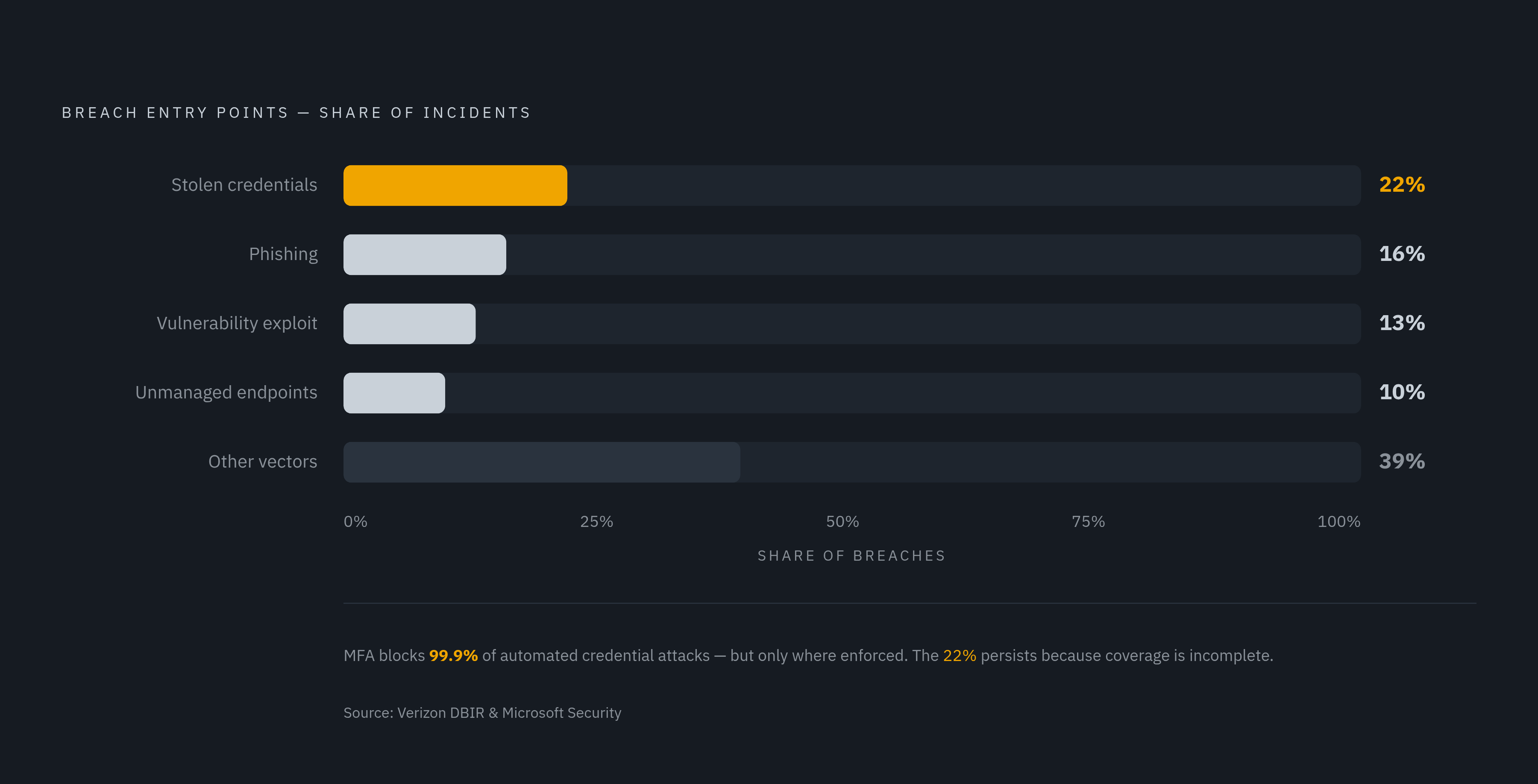
Out of all these surfaces, two get exploited far more than the rest: stolen credentials and unmanaged endpoints. These two take the least skill to break, not because the other surfaces don't matter.
Credential theft leads the field. The Verizon Data Breach Investigations Report attributes 22% of breaches to stolen credentials as the initial point of entry, and most ransomware victims trace back to credentials that had already leaked in infostealer logs. Remote teams make this worse simply by their nature: more services, more locations, more login events, more chances for one of those logins to end up harvested and sold.
Endpoints carry a parallel weakness. Traditional antivirus just matches files against a database of known threats. Most intrusions recorded today involve no malware file. Attackers instead use tools that are already sitting on the computer, like built-in scripting and system-management utilities, so they can move around the network without ever installing anything a signature-based tool would recognize. Legacy antivirus simply doesn't see this kind of activity, because there's no file to scan.
This gets worse without visibility. Many organizations run no centralized monitoring on their endpoints, so a remote worker's laptop is effectively invisible to IT until something breaks. If an attacker gets into that laptop, they can move sideways through connected systems well before anyone notices.
Multi-factor authentication blocks a huge share of automated credential attacks, but it only works where it's actually turned on. The gaps tend to cluster in predictable places: executive accounts that got exempted for convenience, legacy applications that don't support modern authentication, and BYOD sign-ins nobody thought to lock down. Those gaps are exactly where attackers aim.
SMBs With Lean IT Are a Preferred Target
Small businesses often think they're too small for an attacker to bother with. That assumption is backwards. Small and mid-size businesses are targeted deliberately, because they combine three things attackers want: real data, real money moving through their accounts, and a fraction of the security infrastructure a large enterprise would have in place. That mix makes them accessible, and it makes them profitable.
Company size also changes how exposed each employee is. At a small business, headcount is thin enough that one person often handles several external-facing roles, answering customer emails, managing vendor payments, posting on social media. Each of those roles is a point of contact an attacker can target, and with fewer people to spread the load, each employee at a small business ends up facing far more social engineering attempts per person than an employee at a large enterprise would.
Ransomware-as-a-service changed the economics further. These platforms now account for most ransomware attacks overall, so an attacker no longer needs deep technical skill. They just rent the capability from someone who built it, and that rental model pushes the cost of targeting a small business down close to zero. Some of the most active ransomware operations are growing fast as a result: Qilin, among the most active groups right now, saw a very large year-over-year jump in confirmed attacks, and Akira grew substantially as well.
Getting hit doesn't just cause disruption. It threatens the business's survival outright: 75% of small and mid-size businesses say they could not continue operating if hit by ransomware. Paying the ransom doesn't fix the underlying problem, either. Most businesses that paid were attacked again soon after, often within the same month, because the vulnerability that let the attacker in the first time was never actually closed.
Controls That Address Remote Endpoint Risk for Lean Teams
A lean IT team can't fix every surface at once, and trying to will spread effort too thin to close anything properly. The right sequence starts with identity, moves to endpoint visibility, and then addresses device hygiene, because these three close the paths attackers use most.
Identity comes first. Phishing-resistant multi-factor authentication needs to run on every single authentication path, not just the main ones, including BYOD sign-ins, executive accounts, finance accounts, and old legacy applications that tend to get skipped. Microsoft's identity security telemetry shows MFA blocks more than 99.9% of automated credential attacks, but that number only holds when MFA is enforced everywhere, with no exceptions carved out for convenience. SMS codes and push notifications no longer hold up against modern adversary-in-the-middle phishing kits, so high-value accounts should move to phishing-resistant options like FIDO2 hardware keys or passkeys built into the device. Conditional access policies restrict logins based on device condition and network location, so you get a second checkpoint beyond the password itself.
Endpoint visibility comes next. Behavioral monitoring, commonly called endpoint detection and response (EDR), watches process trees, registry changes, lateral movement, and suspicious script activity, catching the living-off-the-land techniques that signature-based antivirus misses. For SMBs without security analysts on staff, pairing EDR with a managed detection and response service has become the standard path forward: the EDR tool spots the behavior, and the managed service makes sure a human actually acts on the alert. BYOD devices don't get a pass here. Every personal device touching business applications needs some minimum level of security enforcement, even when you can't realistically enroll every machine in a device management system.
Device hygiene rounds out the sequence. Unpatched systems remain one of the easiest ways in, and centralized patch management closes known vulnerabilities before an attacker can use them. You can achieve this without a large team, because automated patching tools don't require you to manually track every machine.
Two more controls round out the picture. Zero Trust network access should replace the traditional VPN. A VPN grants full access to the network once someone authenticates, so if a credential gets stolen, the attacker inherits that same broad access. Zero Trust network access grants access only to the specific application a user is authorized for, limiting a stolen credential's damage to that one app. DNS filtering is worth adding as a low-friction first layer, because it blocks malicious domains before a connection gets made and needs no agent on most platforms. Finally, shadow IT needs a policy: set an approved list of tools, and actually enforce it, since unvetted browser extensions and personal SaaS apps remain one of the most overlooked gaps most small businesses leave wide open.
How a unified platform approach changes what lean teams can realistically enforce
The controls above are well understood individually. The gap appears in how they get managed. For a lean team running five separate tools from five separate vendors, the overhead of the stack itself becomes a weak point: each tool needs its own setup, its own policies, its own alert queue, and its own renewal date to track. Configuration gaps, alert fatigue, and missed integrations between tools open up the exact blind spots those tools were bought to close.
Defending a small business comes down to visibility and consolidation. A team can't defend what it can't see, so if you run five disconnected tools, you get five disconnected, partial views of what's actually happening across the business. Each extra tool adds its own configuration burden, and for a founder or an IT generalist without a security background, that added complexity becomes its own source of risk.
Integrated platforms, the kind that combine device management, endpoint security, identity protection, and compliance checks into one console, shrink that configuration surface and remove the gaps that tend to open up at the seams between separate point tools.
CrowdStrike Falcon stands as a strong example of what cloud-native integration looks like at the endpoint layer. A lightweight agent streams telemetry to the cloud in real time, and all policy management, threat hunting, and response work happens through one console, with no on-premises server to maintain. CrowdStrike Falcon Endpoint Security addresses the BYOD and unmanaged device problem directly: its File System Containment feature automatically blocks ransomware at the file access level, even when the attack starts from a device IT never managed. CrowdStrike Falcon for Mobile now supports unmanaged iOS devices, so you get protection on personal phones without the cost and complexity of full mobile device management enrollment. For small and mid-size businesses specifically, CrowdStrike Falcon Complete Next-Gen MDR works as an extension of the customer's own team, delivering threat detection, investigation, and response around the clock across endpoints, cloud workloads, and identities. It's a fully managed path that closes the analyst gap without requiring the business to hire security staff of its own.
Building the same coverage piece by piece costs more than buying an integrated platform, and it holds up worse under pressure, because the gaps between separate tools are exactly where attackers find their way in.
What non-security practitioners should do first when they recognize the gap
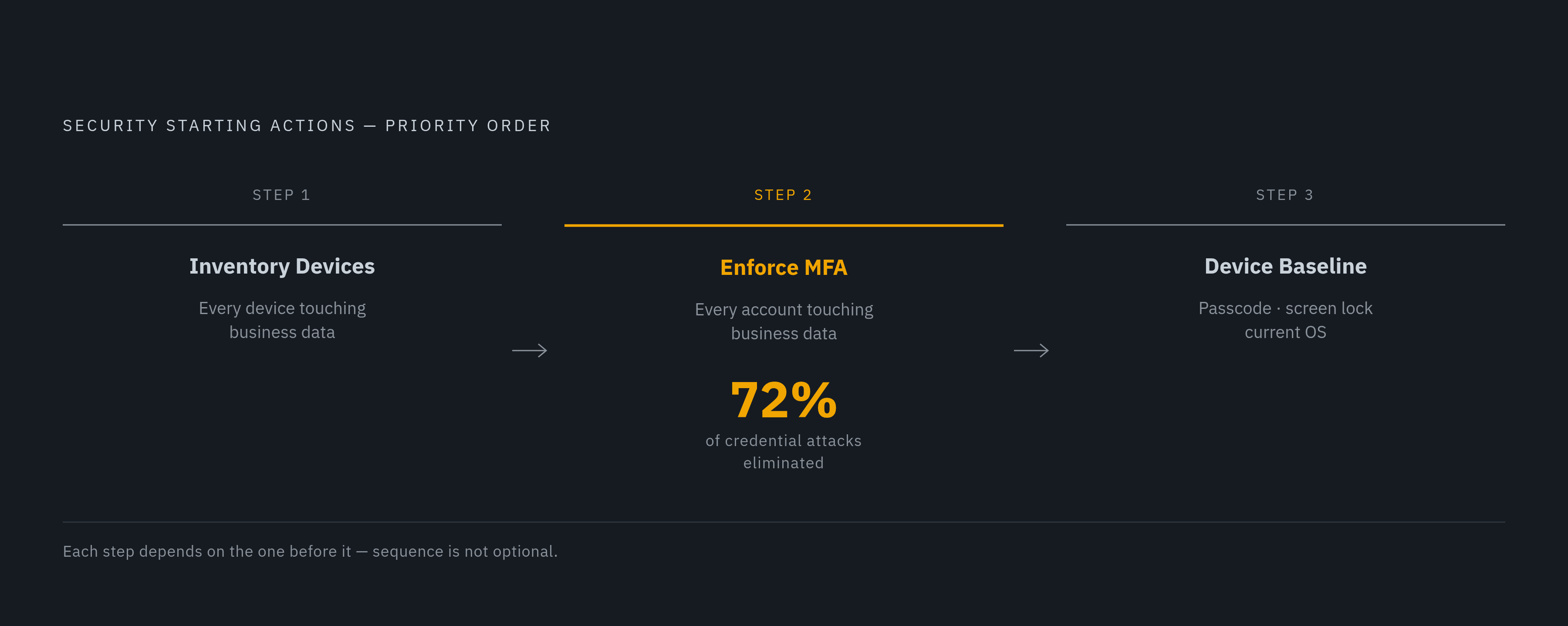
Most lean teams that understand this problem still don't act on it, not from a lack of concern but from not knowing where to start. The starting point is narrower than it sounds, and none of these first moves require a security background to carry out.
The first move is an inventory: list every device connecting to business data right now, corporate laptops, personal phones, tablets, all of it. No control that follows this step works without it, because a business can't enforce a security standard on a device it doesn't know exists.
The second move is to enforce multi-factor authentication on every account that touches business data, starting with email, the identity provider, and any financial or payroll system. This single step eliminates roughly 72% of credential-based attacks by available estimates, needs no specialized tooling to set up, and shuts down the most commonly exploited way attackers get in.
The third move is setting a baseline for what counts as secure enough to connect. Even a simple rule, requiring a passcode, a screen lock, and a current operating system version, puts a business in a far better position than having no standard at all, and it gives the business a reference point for evaluating any management tool it considers down the line.
Once those three moves are done, the next decision is whether to keep assembling individual tools or move to a single integrated platform. The case for the platform is that it enforces these baselines continuously and automatically, without requiring an IT generalist to manually check every control on every device by hand.
None of this starts with buying something. It starts with knowing what's already connected. The inventory isn't a preliminary step before the real work begins, it is the first real security decision a lean team makes.